Open-source productivity platform · in development
Your business. Your data. Your rules.
A self-hosted, open-source productivity platform designed to give businesses and MSPs control over email, calendars, files, documents, collaboration and infrastructure.
No mandatory per-user software licensing. No artificial first-party limits. No dependence on a proprietary hosting ecosystem.
See the roadmap Register for early access In development. Nothing is released yet.

Proposed interface concept Not released · example data · subject to change
Maya Okafor
Inbox12 Drafts2 Sent Scheduled1 Archive Junk3 Deleted Clients Harbor Street Dental Kestrel Logistics2accounts@ (shared)
Inbox7 Sent- Today
-
GL Grace Lin · Harbor Street Dental11:08October statement — two deposits unmatchedHi Maya, our October statement is attached. Two insurance deposits…
-
AP Ana Petrov · Kestrel Logistics10:42Invitation: Year-end planningThu 19 Nov, 10:00–11:00, Board room. Agenda: fuel surcharge accruals…
-
DW Dana Whitlock10:15Re: Engagement letter — Cobalt Ridge BuildersI’ve made the changes to section 4; the fee schedule now matches the…
-
TH Tom Haddad09:31Payroll cut-off moved to WednesdayBecause of the holiday on Thursday the provider needs approved hours…
- Yesterday
-
OP Owen Price · Meadowlane BakerySunQuarterly sales tax returnDo we still file for the quarter if the second shop only opened in…
-
PN Priya NairSunAccrual schedule — draft for reviewDraft attached. Kestrel fuel surcharge is the only estimate I’m unsure…
- Last week
-
JB Jonas Berg · Alder & Finch ArchitectsFriSigned: 2027 retainerSigned copy attached. Please send the first invoice to our new…
October statement — two deposits unmatched
External sender. Harbor Street Dental is in your contacts.
Hi Maya,
Our October statement is attached. Two insurance deposits don’t match anything on our side:
- 14 Oct — $1,862.40 from Lakeside Benefits Plan
- 27 Oct — $640.00, reference HSD-4471
The remittance advice for the first one is in the spreadsheet. Could you check they were posted to the right patient accounts before you close the month?
Thanks,
Grace Lin
Office Manager, Harbor Street Dental


Proposed interface concept Not released · example data · subject to change
- 2 people without MFAJorge Medina’s grace period ends 19 Nov · Hannah Cole has not signed in yetReview users
- DKIM pending for northfield-cpa.exampleRecord published 12 Nov, not yet seen by DNS · DMARC missingShow records
- Mail forwarding to an outside addressRule created by Dana Whitlock at 09:30 · flagged by policyReview
- Sam Ortega is at 89% of 50 GBFiles storage · grew 6.2 GB in 30 daysChange quota
- Document editor 2.9.0 needs your approvalFeature update · window Sat 28 Nov, 02:00–04:00Review
- 11:12PolicyLocked account · sam.ortega · 5 failed sign-ins
- 10:58RVRosa Valdez Ridgeline ITChanged mail flow rule · Auto-forwarding to outside addresses
- 10:52MOMaya OkaforApproved change request · CR-1182 from Ridgeline IT
- 10:41RVRosa Valdez Ridgeline ITReset MFA · priya.nair
- 10:12THTom HaddadReset password · jorge.medina
- 08:40PNPriya NairAdded member to group · Finance · Owen Price
- Planned maintenanceToday Mail service 1.14.3 scheduled Sat 21 Nov, 02:00 by Ridgeline IT Security fix, rated high. Mail may pause for up to 10 minutes; phones reconnect on their own. You can request a deferral of up to 7 days. Request deferralDetails
- Needs approvalThu Document editor 2.9.0 — tracked changes in the side panel Feature update. Nothing changes until you approve; proposed window Sat 28 Nov. ApproveRelease notes
- Policy change10 Nov Security keys required for all admin accounts from 1 Dec Ridgeline IT is tightening admin sign-in for every customer. Maya Okafor and Tom Haddad already use keys. Details
- Resolved10 Nov Calendar sync delays, 10 Nov 14:05–14:40 Some phones showed changes up to 30 minutes late. Post-incident report available. Read report
- MailOperational
- Calendar and contactsOperational
- Files and syncOperational
- Document editingSlow to open since 09:40 · investigatingDegraded
- Chat and meetingsOperational
- Sign-in and MFAOperational
- CallsNot set up · needs a carrierOff
612 GBof 1 TB used · 388 GB free
- Personal files246 GB
- Team libraries210 GB
- Mailboxes138 GB
- Chat and recordings18 GB
+14 GB in 30 days · about 2 years left at this rate
Nearest to quota
- Sam Ortega44.7 / 50 GB
- Dana Whitlock31.2 / 50 GB
- Finance library84 GB · no cap

Who it is being built for
-
Organizations
For businesses that want more control over their productivity infrastructure, their data, where it is hosted and what it costs over time.
Office Unbound for businesses -
Managed service providers
For MSPs that want to host, manage and support a productivity platform of their own, instead of only reselling someone else’s cloud subscriptions.
- Own the customer relationship
- Offer hosted productivity services
- Control infrastructure and service delivery
- Build recurring service revenue
- Stand apart from competing MSPs
- Manage many customers from one place
-
Developers and contributors
For developers who want to help build an open-source productivity ecosystem around documented architecture, open standards and customer ownership.
For developers and integrators
Licensing
Escape the licensing treadmill.
Businesses shouldn’t have to pay more every time they hire someone, add a mailbox or open another office.
Office Unbound is being built around independently maintainable open-source software, with no mandatory per-user, per-mailbox or per-connection software licensing for its intended core functions. Growth should be an infrastructure decision, not a licensing negotiation.
Under evaluation A design commitment, not a finished feature. Infrastructure capacity, third-party license obligations, optional services and operating costs still apply, and the licensing review of each component is not complete. Where a vendor’s packaged build carries restrictions its source license does not, the project intends to build and maintain its own distribution, where that license permits.
- No mandatory per-user software licensing
- No mandatory mailbox licensing
- No mandatory document-editing subscriptions
- No mandatory commercial subscriptions for essential functions
- No mandatory external AI services
- No artificial first-party limits on users or organizations
Why Office Unbound?
Businesses and MSPs should have the option to own and control the infrastructure behind their productivity services.
Today that choice mostly means accepting one provider’s cloud, update schedule and long-term terms. Office Unbound is being designed as an open-source platform that can be self-hosted or MSP-hosted, so the people who depend on it decide how it runs.
For businesses
- Control your infrastructureChoose where your business data and services live: your servers, a private cloud or an MSP’s.
- Own your dataYou control backups, exports, retention and recovery, not a provider’s account terms.
- Stop paying for artificial limitsDesigned without mandatory per-user software licensing. Hiring someone should not change your software bill.
- Choose your maintenance scheduleYou or your provider decide when updates are tested and deployed.
- Keep your options openOpen protocols and exportable data avoid needless dependence on one proprietary hosting provider.
- Simplify daily workMail, calendar, files, documents and collaboration together, behind one sign-in.
- Your organizationUsers, data, policies, retention, who has access
- Your IT team or your MSPServers or private cloud, backups and restore tests, disaster recovery, monitoring, updates on your schedule
- The Office Unbound projectOpen-source code, with signed releases, SBOMs and security advisories planned
More control means more responsibility
Whoever hosts Office Unbound, your IT team or your MSP, takes on the patching, monitoring, capacity and support that a SaaS provider would otherwise carry, and is responsible for backups, restore testing, retention and disaster recovery. The Infrastructure Control Server is designed to reduce that work, not remove it.
For MSPs: build your own productivity hosting business
MSPs shouldn’t have to hand their margins to another vendor’s per-seat subscription model. Office Unbound is designed to let the MSP own the hosting and management relationship.
- Customer provisioningNew customer organizations set up from templates, each isolated from the others.
- Centralized infrastructureEvery customer’s hosts and services watched, patched and planned from the Infrastructure Control Server.
- Costs you can seeSpending follows hardware, storage and staff you plan, not a vendor’s per-seat price list. Not necessarily lower.
- Your pricing, your servicesYou set the price of hosting, migration, support, backup and security.
- Customer isolation and monitoringSeparate tenants, scoped technician access and central alerting.
- Automated updates, customer windowsUpdates rolled out in rings, in maintenance windows each customer agrees.
The MSP opportunity, in full Revenue and operating costs The MSP Control Center concept
For the broader ecosystem
- Open-source foundationsBuilt on established open-source projects such as Keycloak, OpenCloud and Collabora Online, with own builds where a vendor’s distribution would add licensing. Office Unbound’s own code is public under AGPL-3.0, as pre-alpha lab work.
- Open standardsIMAP, SMTP, CalDAV, CardDAV, WebDAV, OpenID Connect, SAML and Matrix, rather than private interfaces.
- Decisions made in publicComponent evaluations, decisions and corrections are published with dates on the updates page.
- Customer-controlled hostingOn-premises, private cloud or MSP-hosted, with Proxmox VE as the initial deployment target.
- Data portabilityExportable data in documented formats, so an organization can change operator without starting over.
- No artificial dependenceDesigned so the platform does not rely on any single vendor’s hosted service to keep working.
Why the platform is open source Components and their licenses Ownership and independence
Compare the deployment models: typical SaaS-only and Office Unbound
Microsoft 365 and Google Workspace already offer regional data controls, integrations, strong security features and data export. This compares deployment models, not product quality: Office Unbound is a different approach, not a universally better one.
- Release and advisory
- Review
- Schedule a window
- Pilot ring
- Broad rollout
- Roll back if needed
Common questions
Is Office Unbound available today?
No. The project is in Phase 1: Control server foundation and core platform proof, with pre-alpha work in its lab. Nothing has been released, and the screens on this site are design concepts. You can register interest, become an MSP design partner or contribute. Roadmap.
Why would I switch from Microsoft 365?
You may not need to. Microsoft 365 is mature and capable. Office Unbound is for organizations that want their data on infrastructure they choose, updates on their schedule and software they can inspect, and that accept running it themselves or paying an MSP to. It is in development, so for now the realistic step is to follow the project or take part in testing. Compared workload by workload.
Can I keep using Outlook or other mail clients?
Standard IMAP, SMTP, CalDAV and CardDAV access is planned, so clients such as Thunderbird, Apple Mail and phone mail apps are intended to connect. Classic Outlook for Windows and Outlook for Mac are the native targets of the project’s mail stack, which passes protocol checks in the lab; new Outlook and Outlook mobile can only use IMAP and SMTP. No real client has been tested yet, so no Outlook compatibility is claimed. Mail clients and sign-in.
What will it cost?
Office Unbound is being designed with no mandatory per-user, per-mailbox, per-document or per-connection software licensing for its core functions; its own code is licensed under AGPL-3.0. Running it still costs hosting, administration and support, either in-house or within an MSP’s service price, and optional services such as SMS or telephony carriers cost what their providers charge. An operator can choose a vendor’s commercial edition or support contract, but the core is not designed to need one. No pricing has been set, and no savings are promised. Costs and licensing.
Is the software actually open source?
Yes. Public source for Office Unbound’s own components is a founding principle, and the source repository is public, with the project’s own code licensed under AGPL-3.0. It holds pre-alpha lab work, not a release. Signed releases and software bills of materials are planned from the first release; neither exists yet. Some components it is designed to use also sell commercial editions; where a vendor’s distribution would add licensing, the project intends to build its own from source, where the license permits. Why open source.
Who maintains updates and security?
The project plans to publish releases and security advisories; none have been published yet. Whoever hosts a deployment, your IT team or your MSP, applies them on the schedule they set, with planned rollout rings and rollback. Critical security fixes are not meant to be deferred indefinitely. Security controls.
Can an MSP host and manage everything?
That is a primary design goal: multi-tenant administration, customer isolation, delegated technician access, and the Infrastructure Control Server for operations, while each customer keeps its own admin center and audit log. These capabilities are planned, not built; only the first parts of the Infrastructure Control Server run in the project’s lab. For managed service providers.
How will migrations work?
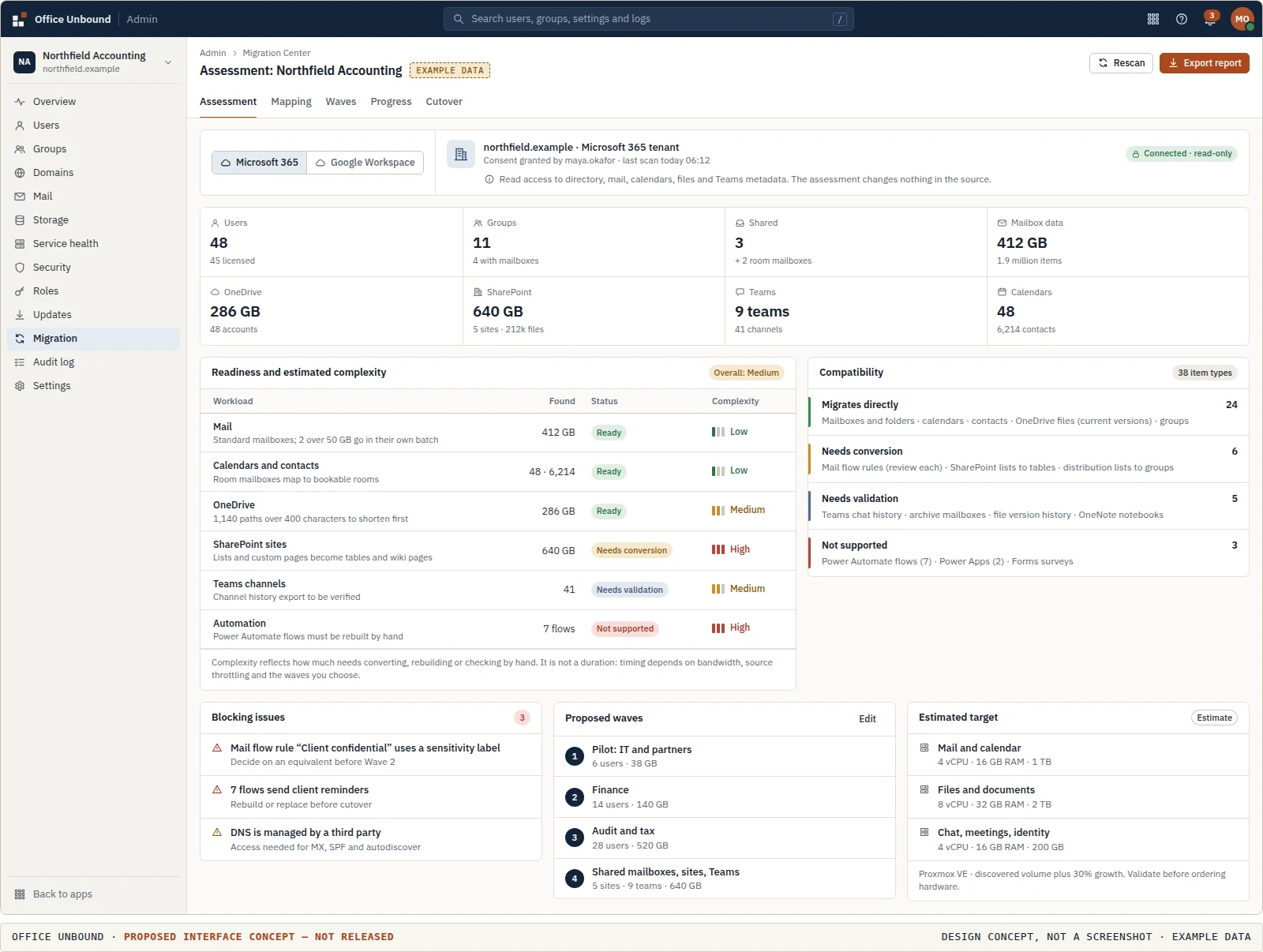
In planned stages: read-only discovery, an assessment of what moves directly, needs conversion or is not supported, identity mapping and waves, staged transfer, verification, then cutover with a rollback window. How long it takes depends on the organization; figures shown on this site are illustrative. Migration overview.
For managed service providers
Own the service. Own the customer relationship.
Instead of simply reselling another company’s subscriptions, MSPs can provide and manage the underlying productivity infrastructure themselves. No mandatory per-customer or per-seat software licensing is intended.
The resale model today
- The vendor controls software licensing
- The vendor sets per-user prices and subscription tiers
- The MSP resells another company’s service
- The MSP has little control over the infrastructure underneath
The model Office Unbound is designed for
- The MSP controls hosting and infrastructure
- The MSP sets its own service pricing
- The MSP provisions and administers customers
- The MSP runs migrations, backups and security
- The MSP keeps the service relationship
Services an MSP could charge for
- Hosting
- Managed administration
- Migration
- Backup
- Security
- Monitoring
- Support
- Infrastructure management
- Consulting
No margins or savings are promised: an MSP carries the hardware, staff and support costs a SaaS vendor would otherwise carry. The platform is planned; there is no partner program yet.
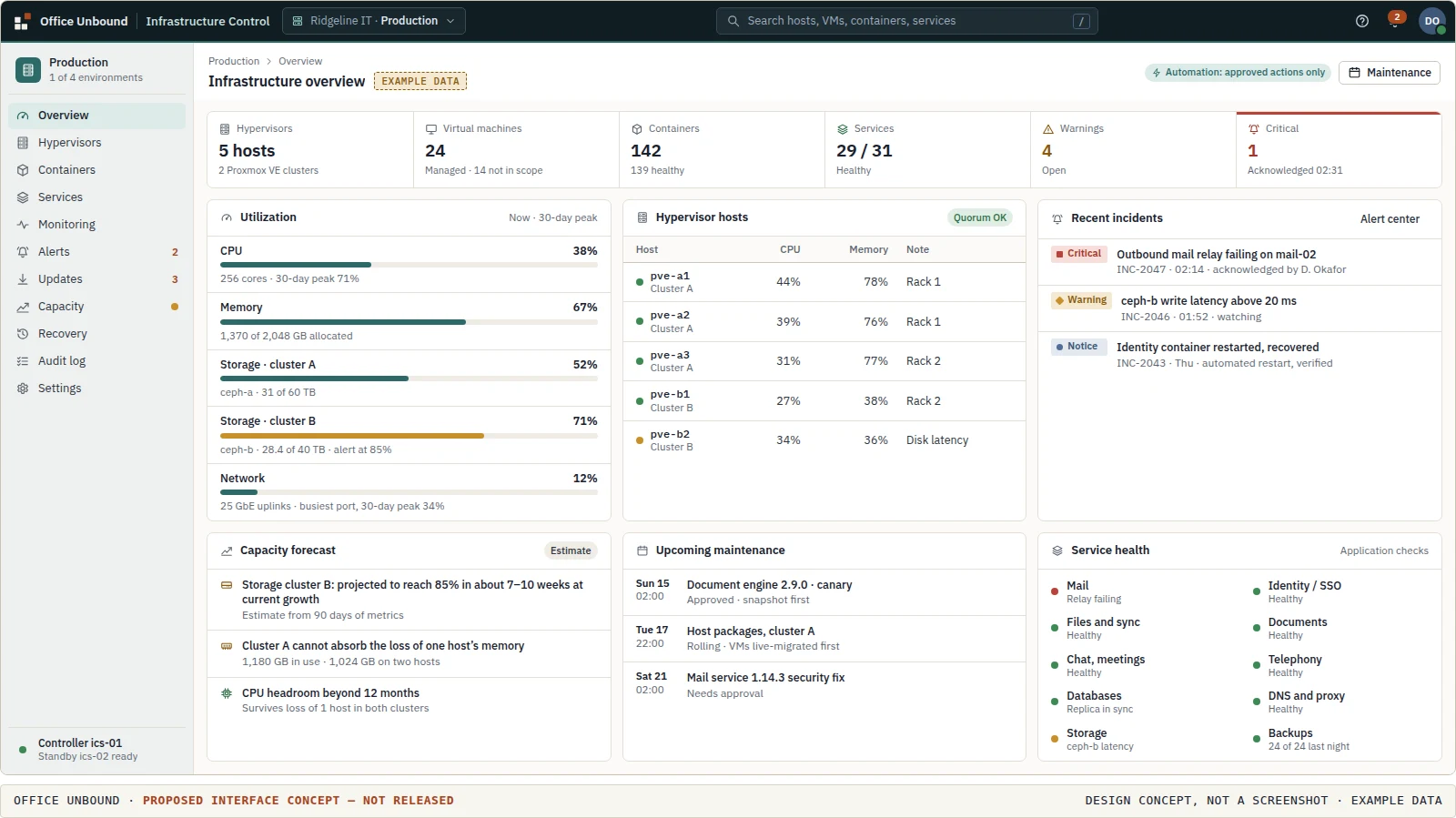
Infrastructure Control Server Planned
One control center. Your entire infrastructure.
Self-hosting usually means assembling separate tools to watch, patch, recover and grow the servers underneath. The Infrastructure Control Server is being designed to do that work for the infrastructure Office Unbound runs on, from one place.
- Proxmox VE hosts, virtual machines and containers
- Applications and service health, with resource usage
- Alerting and escalation
- Approved remediation and controlled restarts
- Updates and rollback on maintenance windows
- Backups and recovery
- Capacity forecasts and scaling plans
- Deployment automation
No mandatory external AI services. Monitoring, deployment, recovery and access control are deterministic operations, and recovery actions are approved and verified, not left to guesswork.
- Organization administrationUsers, groups, policies and updates for one organization
- Identity and sign-inSingle sign-on, MFA and the directory every service trusts
- MSP Control CenterMany customer organizations, with scoped technician access
- Infrastructure Control ServerHosts, VMs, containers, services, updates and capacity
Related, but separate: each has its own interface, permissions and audit trail, so running the servers never requires access to a customer’s mail, and administering an organization never requires access to the hypervisor.
Migration from Microsoft 365 and Google Workspace
Leaving Microsoft 365 shouldn’t be the hard part.
Before anything moves, the planned assessment tells you what can move, what can’t, what needs attention and what the migration will take. You decide with that report in hand, not after the first batch fails.
Planned; none of the migration tooling exists yet. Some proprietary features and data types will not transfer, and the assessment is designed to say which.
- ConnectSecurely, with read-only access.
- DiscoverUsers, groups and services.
- InventoryMailboxes and storage.
- AssessCalendars and contacts.
- MapUsers and permissions.
- FlagUnsupported functionality.
- EstimateWhat the move will require.
- ReportReadiness, before you commit.
- Dry runWith a small pilot group.
- MigrateIn stages, then delta sync.
- VerifyCounts and content compared.
- Cut overWith a recovery plan.
Interface concepts
One workspace, four ways to run it.
People work in the workspace. Organizations, managed service providers and infrastructure operators each get their own console, with separate access and responsibilities. These are proposed interface concepts, not released software.
-
 For everyone
The workspace
Mail, calendar, files and documents from one start page.
Proposed concept · not released
-
 For organization administrators
Organization admin center
Users, groups, domains, security policies and updates.
Proposed concept · not released
-
 For managed service providers
MSP Control Center
Every customer organization, with access scoped per technician.
Proposed concept · not released
-
 For infrastructure operators
Infrastructure Control Server
Hosts, services, alerts and capacity across the platform.
Proposed concept · not released
The platform
One workspace. One sign-in. Complete control.
Everyday applications for people, and the identity, administration and migration capabilities that sit across them. All are Planned, built on open-source components that are Under evaluation.
- MailPersonal and shared mailboxes, rules and signatures.
- CalendarShared calendars, scheduling and room booking.
- ContactsPersonal contacts and the company directory.
- FilesPersonal storage, team libraries and desktop sync.
- DocumentsWord-processing files edited together in the browser.
- SpreadsheetsWorkbooks with formulas, charts and co-editing.
- PresentationsSlide decks built and presented from the browser.
- ChatTeam channels, threads and direct messages.
- MeetingsVideo meetings scheduled from the calendar.
- VoiceSoftphone and business telephony.
- Identity and SSOAdministrative capabilityOne sign-in, MFA, groups and roles.
- AdministrationAdministrative capabilityUsers, policies, updates and audit in one console.
- Migration toolsAdministrative capabilityAssessment and staged moves from Microsoft 365 and Google Workspace.
- The platform overviewHow the applications share one identity, one interface and one administration layer →
Software ownership
Open source isn’t enough. The goal is control of the software itself.
Source code you can read is a start. Office Unbound intends to go further where that is needed to keep essential functions free of mandatory commercial editions: build its own distributions from upstream source, maintain patches, and fork where an upstream distribution’s restrictions get in the way, where the license permits.
That is a responsibility, not a shortcut. Own builds mean the project carries the maintenance, security patching and compatibility work that a vendor would otherwise do. Third-party source licenses, notices and trademark rules still apply to every build.
- Inspect
- Source code and dependencies audited before a component is adopted.
- Build
- Independent distributions from upstream source where necessary, with maintained patches.
- Inventory
- A published software bill of materials for every release.
- Sign
- Signed releases, so administrators can verify what they install.
- Scan
- Dependency and vulnerability scanning, with advisories.
- Schedule
- Updates applied when the operator decides, with rollout rings.
- Status
- The build and release pipeline is In development, starting with the project’s own Collabora build. No build or release has been published yet; the source repository holds pre-alpha lab work. Only the private vulnerability report route is available now.
Your infrastructure should move when you do.
Data the customer owns, in formats it can export, on hosting it chooses. Changing operator is designed to be a planned migration, not starting over; how smooth that is will depend on testing, not promises.
Hosting and deployment options Ownership, export and portability Target architecture
Project progress
Phase 1: Control server foundation and core platform proof.
Pre-alpha lab work, in the open: the control server and the core services are being built and tested in an isolated lab, with every status backed by recorded evidence in the source repository. Nothing is released yet, and the roadmap has no dates.
- Phase 0DiscoveryTested in lab
- Phase 1Core platform proofCurrent phase
- Phase 2OrchestrationIn development
- Phase 3First user experienceIn development
- Phase 4MSP and administration
- Phase 5Operational maturity
- Phase 6CollaborationIn development
- Phase 7Migration CenterIn development
- Phase 8MSP pilot
Latest updates
Working in the lab
- Control server backend, tested; console, monitoring and user lifecycle in the lab
- Identity on OpenLDAP and Keycloak; mail, calendars and contacts on the project’s own build of the gromox stack; files on OpenCloud; documents in Collabora Online
- Backup and restore to a separate machine, tested for files and identity
Decided so far
- No mandatory software licensing for core functions, with the project’s own builds where a vendor’s package is restricted
- Office Unbound’s own code is AGPL-3.0
- One isolated stack per customer, deployed on Proxmox VE through the control server
How status is reported on this site
Every capability carries one of seven labels, following the source repository’s status record. A label moves forward only with recorded evidence: lab integration for Integrated in lab, published test results for Tested in lab, a supported release for Production-ready. Nothing is released yet.
- ConceptIdea or design direction
- Under evaluationBeing assessed
- PlannedOn the roadmap
- In developmentBeing worked on
- Integrated in labRunning in the lab
- Tested in labPassed published lab tests
- Production-readySupported release
| Area | Detail | Status |
|---|---|---|
| Control server | Backend tested (79 tests); console and user lifecycle in the lab; monitoring and remediation in development | Tested in lab |
| Core services | Identity, mail, calendars, contacts, files and documents integrated in the lab | Integrated in lab |
| Own builds | Collabora Online without connection caps; signed build and release pipeline | In development |
| Chat, meetings, telephony | Desk evaluation; nothing installed | Under evaluation |
| Migration | Read-only readiness assessment, tested against sample data | In development |
| MSP Control Center | Not started | Planned |
| Interface | Workspace and administration screens on this site | Concept |
Get involved
Help shape an alternative.
Office Unbound is being developed as an open-source productivity platform for businesses and MSPs, not another proprietary subscription. Feedback, technical contributions, integration ideas and real-world MSP experience change what gets built first.
-
Businesses evaluating it
Name the workloads that matter most, and be contacted when a component you care about reaches early testing.
Register for early access -
MSP design partners
Bring how you run customers today: provisioning, delegated access, migrations, backups and what your margins depend on.
Become a design partner -
Developers and contributors
Integration, interface, clients and migration connectors, through the public repository; design review and documentation are welcome too.
Developer interest -
Open-source maintainers
Maintain a project Office Unbound is evaluating? Corrections, integration advice and collaboration are welcome.
Contact the project -
The source repository
Office Unbound’s own code is public under AGPL-3.0. It is pre-alpha lab work, not a release; progress shows its current status.
github.com/agit8or1/office-unbound -
Sponsors
Fund development, infrastructure or a specific workstream, such as independent document-editor builds or migration tooling.
Sponsoring the project
Nothing is available to install or sign up for yet, and registering does not create an account or reserve a place. Registrants are contacted when a component they selected reaches early testing, or when the roadmap changes in a way that affects them.